Ad check
Paste an ad and see what Google + Bing would reject before you publish.
Opens after signup
Google Ads + Microsoft Advertising (Bing), side by side
Sign up with Google or Microsoft and open 3 free tools in seconds: check your ads, find wasted spend in your own report, preview your workspace. Nothing gets linked.
Free plan · No credit card · No approval needed
Free, no credit card. Sample data shown.
Inside AdPylon
This is the real product with sample data, not a mockup. Sign up free and click through it yourself.
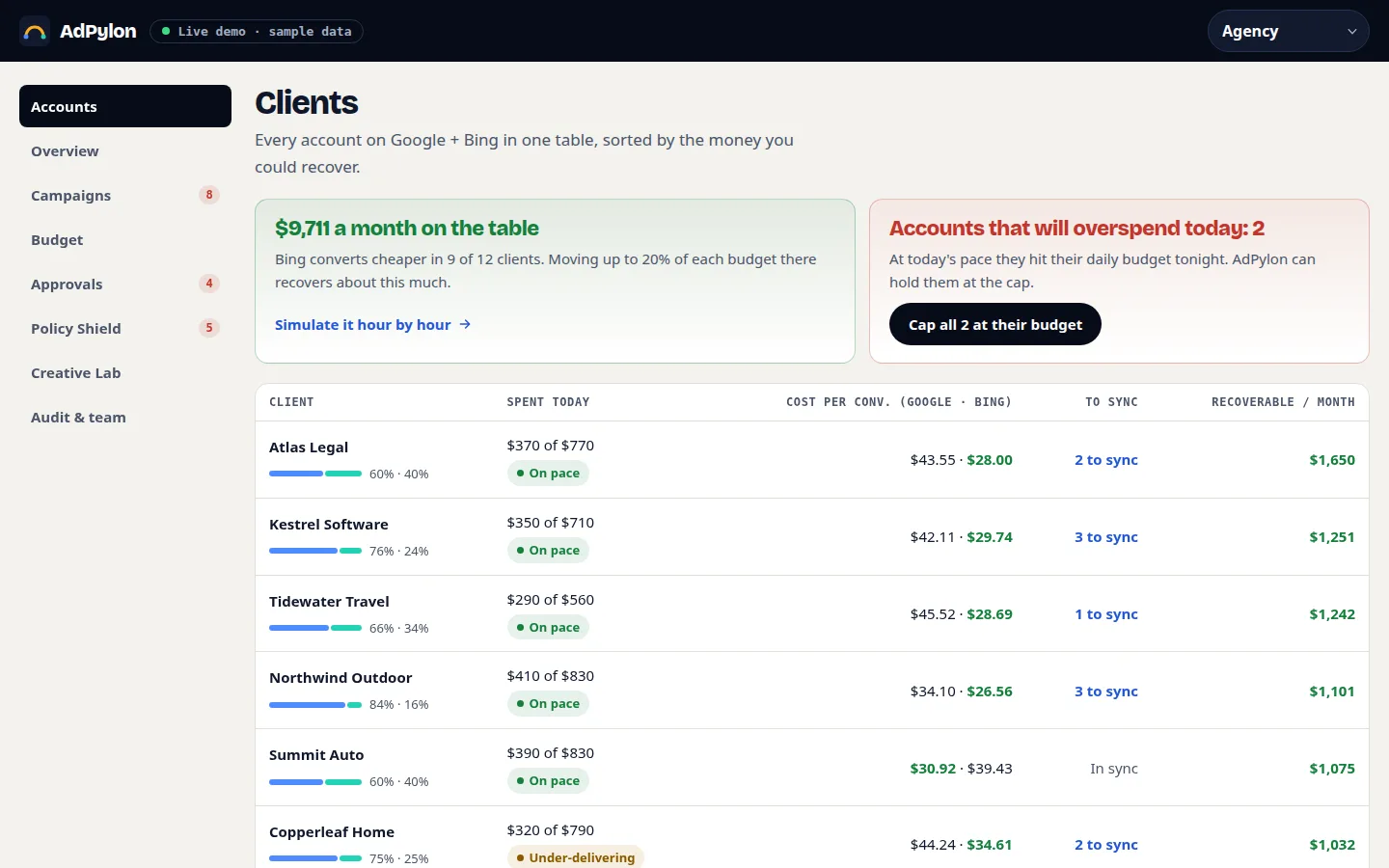
Every Google Ads and Bing account in one table, sorted by the money you could recover. From one store to a full MCC.

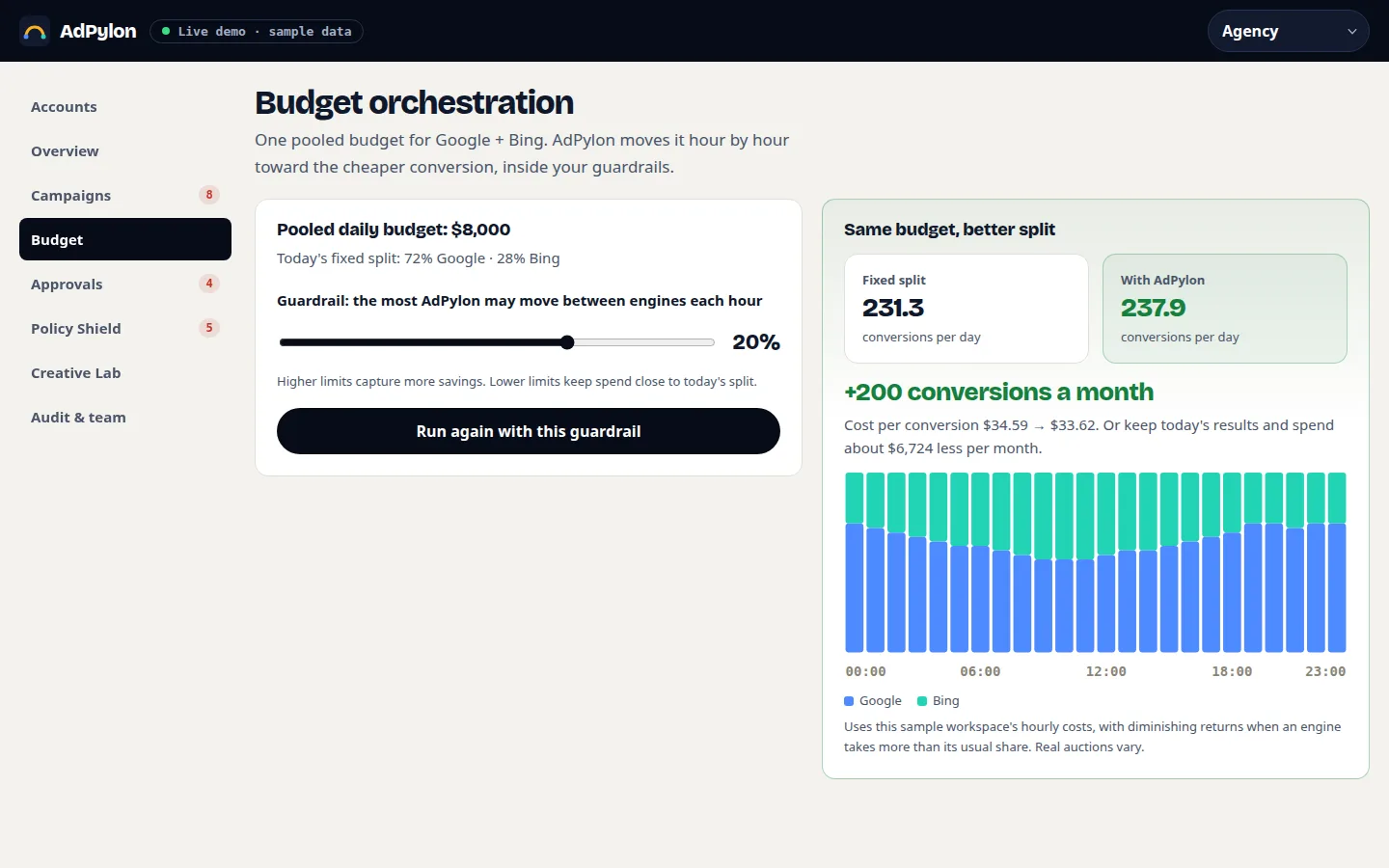
One pooled budget. AdPylon shifts it hour by hour toward the cheaper conversion, inside the guardrails you set.

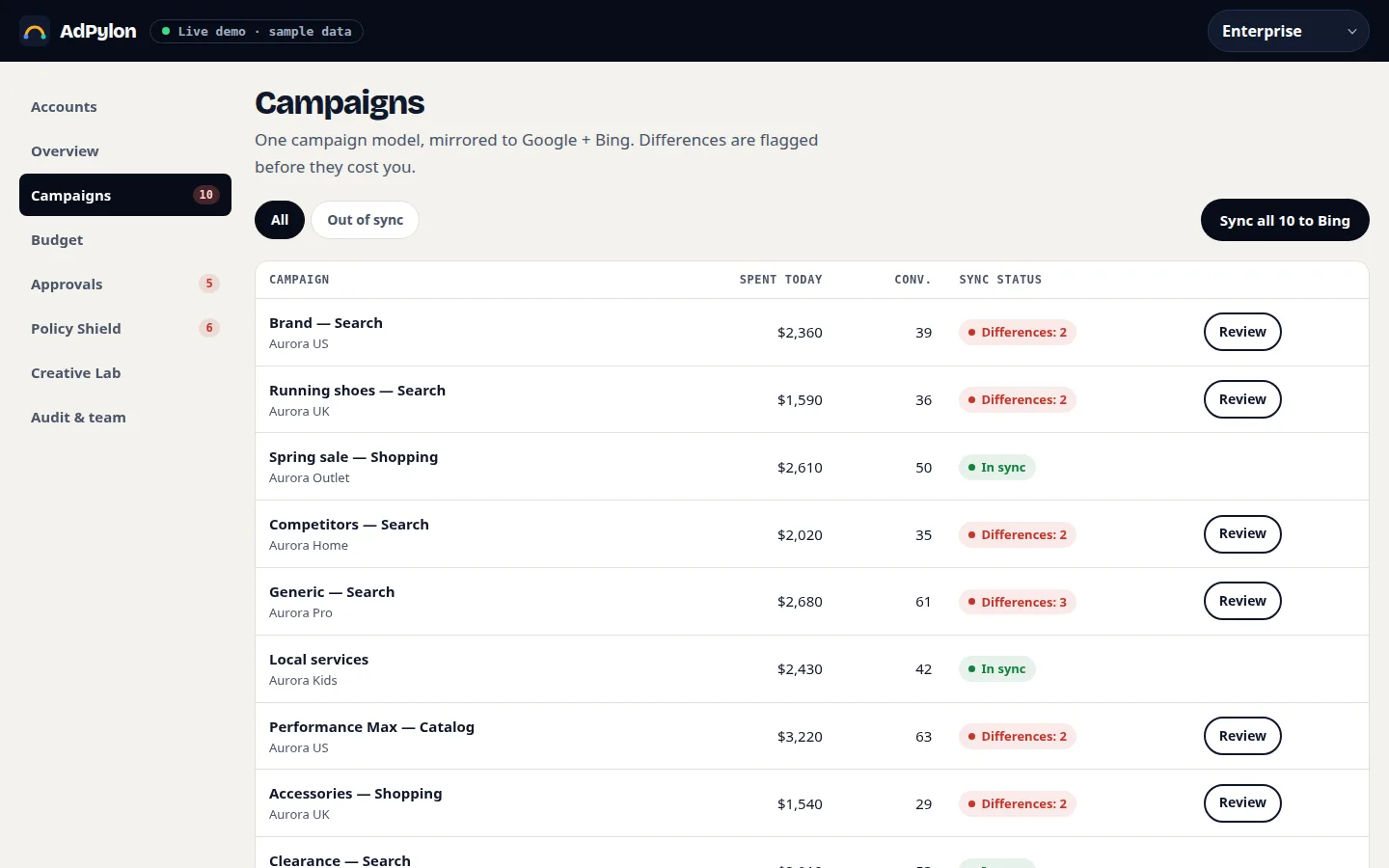
Differences between Google and Bing are flagged before they cost you. Review them, then sync once.

Free toolkit
Sign up with Google or Microsoft and these open right away. Nothing is linked to your ad accounts, so you don't need IT, your boss or a credit card.
Paste an ad and see what Google + Bing would reject before you publish.
Opens after signup
Open a report from your own Google Ads account and see wasted spend in seconds. The file never leaves your computer.
Opens after signup
Click through AdPylon with sample data sized like your accounts, from one account to a full MCC.
Opens after signup
Google or Microsoft sign-in · No credit card · Company account blocked? Use your personal one.
The two-console tax
Why AdPylon
Every feature works across Google + Bing at once, so your team runs one playbook instead of two.
Build a campaign once and AdPylon mirrors it to Google Ads and Microsoft Advertising (Bing): keywords, negatives, ad copy, and bids. A side-by-side diff flags every conflict before anything goes live.
Edit bids in Google Sheets and they sync back to both engines. Approvals arrive as Gmail threads, overspend alerts land in Chat, and every change is logged to Drive.
Pick the autopilot that fits your team. Starter walks you through a guided launch checklist. Growth runs rules with an anomaly kill-switch. Enterprise adds guardrails, roles, and MCC hierarchy.
Set one pooled budget for Google + Bing. Every hour, AdPylon shifts spend toward the engine and keywords delivering the lowest cost per acquisition, inside the caps you define.
Catch disapprovals before you publish. AdPylon predicts policy flags on ads and assets, then checks feed and label health for Shopping and Performance Max so campaigns launch clean.
Generate responsive search ads and asset variations in seconds. Always-on A/B experiments run across both engines and name the winner in plain English, with the numbers to back it.
Product tour
Click through four screens with sample data. Want to test with your own ads? Sign up and open the free tools.
| Item | Bing | |
|---|---|---|
| Keyword: running shoes sale | Live | Live |
| Negative: free | Live | Missing |
| Max CPC | $1.80 | $1.20 |
| Headline 3 | Free 30-day returns | Outdated |
Review 3 changes, then sync
Guardrail: each engine stays between 30% and 75%
Blended CAC: $24.10 → $21.40
AdPylon
Bing is converting 31% cheaper than Google this week. Approve to raise the pooled budget for 7 days.
ApproveReject
Replies are logged with name and time.
Fix 2 issues before publishing
Free, with Google or Microsoft. Then click through every screen with sample data sized like yours.
Why not just use Google Import?
Microsoft Advertising’s Google Import is free and good at one thing: a one-way copy. Here is everything that happens after the copy.
| Capability | AdPylon | Google Import | Spreadsheets + scripts |
|---|---|---|---|
| Sync direction | Two-way | One-way, Google → Bing | Whatever you build |
| One pooled budget across both engines | Shifted hourly | No | No |
| Approvals in Gmail, alerts in Chat | Built in | No | Custom code |
| Edit both engines from Google Sheets | Built in | No | Custom code |
| Policy pre-flight checks | Both engines | No | No |
| A/B experiments across engines | Always on | No | Manual |
| Cost | From $0 | Free | Your team’s hours |
Who it's for
Start on the plan that matches your team today. Your campaigns, rules, and history move with you when you grow.
Starter
For founders and small teams running their first paid search on Google + Bing.
Growth
For marketers and agencies who already have winners and need them to compound.
Enterprise
For in-house teams and networks that need control, compliance, and one view of every account.
Security
Connecting accounts that spend real money should feel safe. Here is exactly what AdPylon can and cannot do.
Imports use read access. Write access is used only for changes you or your rules approve.
Who, what, when, and the before-and-after diff, in an audit log you can export.
Permissions per user and per account. Enterprise adds SSO/SAML.
Disconnect from Google or Microsoft at any time. Export or delete your data whenever you want.
Pricing
Every plan includes Dual-Engine Sync and Policy Shield.
For your first campaigns on Google + Bing.
$0/mo
Start freeMost popular
For teams scaling what already converts.
$99/mo
Start freeFor enterprises and agencies running many accounts.
Custom
Book a demoPrices in USD. Ad spend is billed by Google + Bing directly, never marked up.
FAQ
No. The Launch plan is free with no credit card. Upgrade to Growth only when you need more accounts or automation.
Not without your approval. Imports are read-only until you confirm the first sync, and every change shows a side-by-side diff first.
No. Workspace makes AdPylon faster to operate, but every feature also works in the web app with email alerts.
You set floor and ceiling caps per engine and campaign. AdPylon never moves spend outside them, and the anomaly kill-switch pauses runaway spend.
Google Import is a free, one-way copy from Google Ads to Microsoft Advertising. AdPylon keeps both engines in one model: two-way sync, a pooled budget shifted hourly, approvals in Gmail, and pre-flight policy checks.
Read access to import. Write access only to apply changes you or your rules approve, and every change is logged. You can revoke access from Google or Microsoft at any time.
Yes. Growth covers up to 10 ad accounts. Scale adds MCC hierarchy, client roles, and an audit log for every account you manage.
Sign up with Google or Microsoft and open 3 free tools. Nothing gets linked, no approval needed.
No credit card. No ad-account connection now. Cancel anytime.
Free · No credit card
Start free